If You Think Your Account Is Compromised — Act Immediately
One of the most dangerous mistakes people make when they suspect an account has been compromised is waiting to take action.
Many people assume something like:
- “It’s probably nothing.”
- “It’s just my email.”
- “I’ll deal with it later.”
Unfortunately, cybercriminals move quickly, and every minute matters. Delaying action can allow attackers to gain deeper access into your systems, accounts, finances, and business operations.
Immediate action can often stop an attack early. Waiting can allow it to spread and become significantly more damaging.
Why Delaying Response Makes the Situation Worse
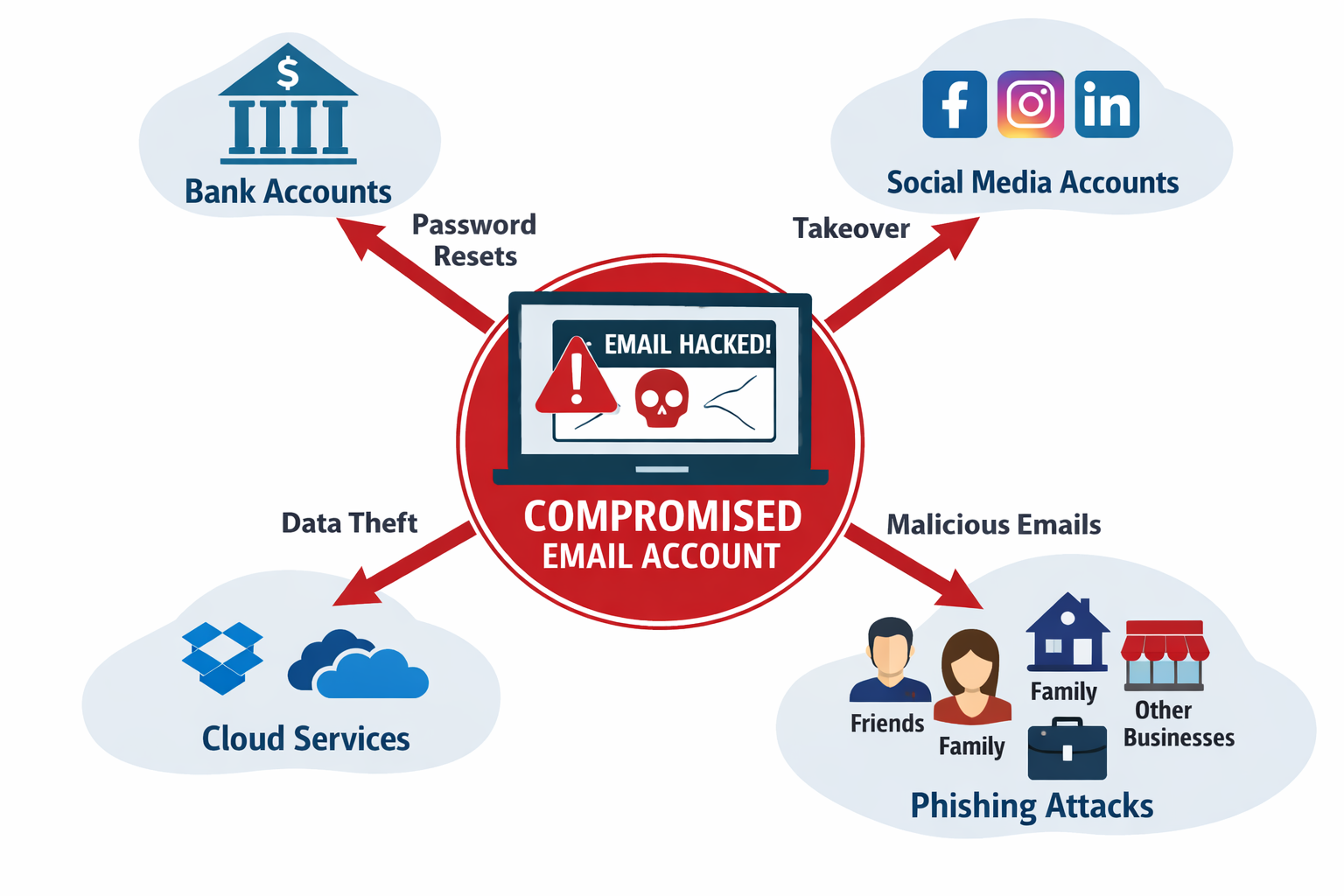
Cyber attackers rarely stop at just one account. Instead, they use the first compromised account as a launch point to gain access to additional systems.
The longer they have access, the more damage they can cause.
Below are some of the most common ways a compromised account can escalate into a much larger security incident.
1. Email Exposure and Data Theft
If your email account is compromised, attackers immediately gain access to:
- Your entire inbox
- Sent messages
- Attachments
- Contact lists
- Calendar entries
- Password reset emails
This information can reveal:
- Financial accounts
- Vendor relationships
- Internal company processes
- Personal conversations
- Sensitive documents
Attackers often search inboxes using keywords like:
- Invoice
- Wire
- Bank
- Payroll
- Password
- Login
This allows them to quickly identify high-value targets and sensitive conversations.
2. Password Reset Attacks
Most online services rely on email-based password resets.
If attackers control your email account, they can reset passwords for services such as:
- Online banking
- Investment accounts
- PayPal or payment systems
- Cloud storage platforms
- Social media accounts
- Business applications
- Vendor portals
Once they gain control of these accounts, they may lock you out while they continue exploiting them.
3. Business Email Compromise (BEC)
For businesses, compromised email accounts can lead to fraudulent financial activity.
Attackers may:
- Send fake invoices to clients
- Request wire transfers
- Change payment instructions
- Impersonate executives
- Redirect payroll deposits
Because these emails come from a real and trusted email account, they are far more convincing than typical phishing attempts.
This type of attack is known as Business Email Compromise, and it costs businesses billions of dollars annually.
4. Attacks on Your Contacts
Once attackers access your email account, they often begin sending phishing emails to people you know.
Your contacts may receive messages that appear legitimate because they come directly from your real email address.
Examples include:
- Fake invoices
- Malware attachments
- Requests for urgent help
- Fake document sharing links
- Payment requests
This spreads the attack to coworkers, friends, vendors, and customers.
5. Access to Cloud Storage
Many email accounts are connected to cloud platforms such as:
- Microsoft 365
- OneDrive
- Google Drive
- SharePoint
- Dropbox
These platforms often store:
- Financial records
- HR documents
- Contracts
- Company data
- Customer records
- Tax documentation
Attackers may download sensitive data, delete files, or even plant malware.
6. Calendar and Meeting Manipulation
Compromised accounts can also allow attackers to:
- Send fake meeting invitations
- Modify scheduled meetings
- Cancel appointments
- Add malicious links to meetings
Some attackers use calendar invites as phishing attacks, tricking users into clicking malicious links.
7. Identity Theft Risks
Email accounts often contain years of personal information, including:
- Addresses
- Phone numbers
- Tax forms
- Medical information
- Legal documents
- Account numbers
Attackers may use this information for identity theft or targeted social engineering attacks.
8. Persistence Inside Your Account
More sophisticated attackers try to maintain long-term access to accounts.
They may:
- Add inbox forwarding rules
- Create hidden inbox rules
- Register new MFA devices
- Add additional recovery emails
- Create administrative users
This allows them to continue accessing your account even after you change your password, unless the account is thoroughly reviewed.
Warning Signs Your Account May Be Compromised
Watch for these indicators:
- Login alerts from unfamiliar locations
- Password reset notifications you did not request
- Emails sent from your account that you didn’t write
- Missing or deleted messages
- Unexpected MFA prompts
- Contacts reporting strange emails from you
- Unknown inbox rules or forwarding settings
If you notice any of these signs, it is important to act immediately.
Immediate Steps You Should Take
If you believe your account may be compromised:
- Change your password immediately
- Enable or confirm multi-factor authentication (MFA)
- Review login history and active sessions
- Check for suspicious inbox rules or forwarding settings
- Remove unknown devices or applications
- Reset passwords on critical accounts
- Notify your IT provider or security team
- Alert contacts if suspicious emails were sent
Quick action can often prevent attackers from gaining further access.
Businesses Should Never Ignore Security Alerts
For businesses, delaying action can allow attackers to:
- Access confidential company data
- Target employees and customers
- Send fraudulent payment requests
- Install malware or ransomware
- Damage company reputation
Cyber incidents should always be treated as urgent security events.
Professional Cybersecurity Protection Matters
Businesses today rely on cybersecurity services to detect and respond to threats quickly. These protections may include:
- Endpoint protection
- Email security monitoring
- Threat detection and response
- Security awareness training
- Incident response services
Learn more about our cybersecurity protection services:
https://www.tmdtechnology.com/computer-cyber-security/
Cybersecurity Support for Businesses in South Florida
TMD Technology provides Managed IT Services and cybersecurity protection for businesses throughout:
- Palm Beach County
- Broward County
- Martin County
Our team helps organizations detect threats early, secure business systems, and respond quickly to potential security incidents.
Learn more about our Managed IT Services:
https://www.tmdtechnology.com/managed-it-services/
Final Thoughts
If you believe your account may be compromised, do not wait.
Attackers move quickly, and delaying action can allow them to:
- Steal sensitive data
- Impersonate you
- Spread phishing attacks
- Access financial accounts
- Compromise additional systems
The faster you respond, the better your chances of stopping the attack before serious damage occurs.
TMD Technology – Managed IT & Cybersecurity Services
Serving Palm Beach, Broward, and Martin County businesses
📞 561-404-9251
🌐 https://www.tmdtechnology.com