The holiday season is one of the busiest times of year for scammers and many Americans are putting themselves at risk. Don’t be one of them.
Here are 10 tips on how to protect yourself from holiday scams:
 Check the charity: Before donating to a charity, make sure it is registered with the Secretary of State and ask how much of the money goes to the charitable fundraiser and how much goes to the charitable purpose.
Travel Safely: Millions hit the road, rail and sky during this holiday season. But with the cost of travel on the rise, especially airfares, passengers are easy prey for a host of scams. Some seem legitimate. But there are some warning signs. For example, you want to travel to Europe or the Bahamas and a travel site offers you a hotel or apartment rental at a great price in a city you want to go to. It seems perfect, except you can’t pay with a credit card. They want cash, a bank or wire transfer. DON’T do it. It’s a scam. Also, during the holidays, you can often be targeted using familiar e-mail addresses of your friends. You may receive an e-mail purporting to be from friends saying they were traveling and had their wallet stolen and that they’re in a hotel, unable to pay their bill. This is a travel scam that uses details taken from social networking sites (such as Facebook) to send phony distress e-mails to family and friends. And of course, these e-mails ask that money be wired or transferred.
Gift Card Fraud: Only purchase gift cards from reputable sources and try to get them directly from the store they’re from. Ask the store cashier to scan the card to ensure it has the correct balance and provide a receipt before leaving. Look at the back of the card to ensure the area with the protective scratch-off is intact.
Surf safely: Do not use public Wi-Fi to check sensitive financial information, or to make purchases using your credit card.
Package Theft: Require a signature on all package deliveries. You can also write specific instructions for the delivery company on where to leave your package, and don’t forget you can always have your package delivered to you at work.
Use credit: Use a credit card instead of your debit card when making holiday purchases.
Fake checks and free gift offers: Websites may offer free gifts if you “click here,” and letters in the mail could ask for personal information in exchange for a $500 check. Believe us, people you don’t know don’t want to give you free money. Remember the adage that there ain’t nothing in life for free. Similarly, the emails and shared status updates on social media saying “click here for your free gift” are likely phishing schemes or malware-laden, and letters asking for an advance payment to receive your free check for thousands of dollars are bogus.
 Beware Suspicious Emails: Pay special attention to emails you receive from sources such as your bank, retailers and shipping companies such as FedEx or UPS. Scammers use the names of reputable companies to try and get you to open attachments containing malicious software or enter logon credentials to your accounts. Never click links from emails or open the attachment in an email, especially if you’re not expecting a message from the source. Instead, close the message and visit the site by manually opening it in your browser. Call the source directly if you are suspicious or believe the message to be false.
Beware of deals: Watch out for deals offered by companies with unfamiliar websites. Look for reviews on Yelp, Google and the Better Business Bureau or search the retailer’s name and “scam” to see if it checks out before giving your payment information.
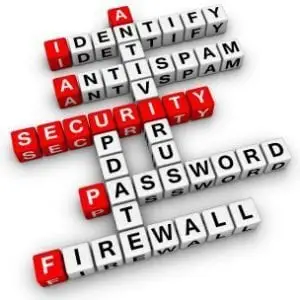
Secure your systems: Take added precautions with your security. Make sure your antivirus and malware software’s are up to date and functioning. Ensure your windows and java security patches are applied and your firewall is configured correctly. Backup your data! These steps along with some simple common sense can help mitigate your exposure while online.
If you need assistance securing your systems or help cleaning up from a suspected scam contact us.
(561) 404-9251 | TMDTechnology.com

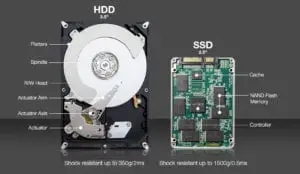 If you’re struggling with a slow or sluggish computer maybe it’s time for an upgrade. The cost of a SSD (Solid State Drive) has dropped dramatically in the past 12 months. For under $200 you can purchase a new 750GB SSD for your laptop or desktop. If you need more capacity, 750 and 1TB SSD’s are also very economical as compared to just a year ago.
 Everyone will be looking online for the best deals for those holiday gifts this year.
 Hurricane Office Protection Suggestions include some of the following based on severity.