Ransomware wake-up call for businesses around the globe

The fallout from the WannaCry ransomware attack will likely reach into the billions of dollars according to many estimates.  The malware attack largely targeted older Windows XP and some Windows 8 systems along with unpatched newer systems that were within many of the affected businesses.  Many of the affected organizations were continuing to run some legacy application that could not run on a newer version of Windows.  This of course is a game of risk roulette considering microsoft stopped activly supporting these older systems.  WannaCry demanded a relatively small amount of money to recover your information but the hit to the reputation of the organizations that fell victim to WannaCry far exceeds any monetary value.

Don’t risk your data to these types of attacks unnecessarily.  For an easily budgeted, fixed monthly fee — we’ll take away the worry, frustration and considerable cost of managing your IT environment.   Our preventive maintenance service for desktops and servers proactively and regimentally monitors and addresses common problems and exploits that ransomware and other malware takes advantage of.  In addition to maintaining updated security we also employ a layered security policy including entrally managed Antivirus and Malware Protection to further reduce risk to your network.

Call today for a free consultation.

IRS Reports Surge in Email, Phishing and Malware Schemes

The IRS has issued several alerts about the fraudulent use of the IRS name or logo by scammers trying to gain access to consumers’ financial information in order to steal their identity and assets. Scammers use the regular mail, telephone, fax or email to set up their victims. When identity theft takes place over the web (email), it is called phishing.

The IRS saw an approximate 400 percent surge in phishing and malware incidents in the 2016 tax season.

Scam emails are designed to trick taxpayers into thinking these are official communications from the IRS or others in the tax industry, including tax software companies. These phishing schemes can ask taxpayers about a wide range of topics. Emails can seek information related to refunds, filing status, confirming personal information, ordering transcripts and verifying PIN information.

Variations of these scams can be seen via text messages, and the communications are being reported in every section of the country. The IRS is aware of email phishing scams that appear to be from the IRS and include a link to a bogus web site intended to mirror the official IRS web site. These emails contain the direction “you are to update your IRS e-file immediately.” The emails mention USA.gov and IRSgov (without a dot between “IRS” and “gov”), though notably, not IRS.gov (with a dot). These emails are not from the IRS.

The sites ask for Social Security numbers and other personal information, which could be used to help file false tax returns. The sites also may carry malware, which can infect people’s computers and allow criminals to access your files or track your keystrokes to gain information.

For more details, see:

The IRS does not initiate taxpayer communications through email. Unsolicited email claiming to be from the IRS, or from an IRS-related component such as EFTPS, should be reported to the IRS at phishing@irs.gov.

For more information, visit the IRS’s Report Phishing web page.

File Folder Creation Takes Several Minutes or Freezes and Crashes

So you’re running Windows 10 and are accessing file and folder shares over your network.  You would think creating a new folder would be a simple task but then you find your computer freezes for several minutes when simply creating a new folder. On all other occasions, the windows explorer locks down, and the cursor is left after the last letter entered in the new folder name. The folder gets a time stamp immediately, but it takes 2-3 minutes before it locks up and you can continue to work.  We have also noted this behavior on local drives (C: and D:).

We found creating a folder using command prompt works immediately.  (md c:\TMD results in a folder named TMD on the c drive with no hesitation)

If you have been frustrated with this issue you’re not alone!  After spending countless hours troubleshooting this issue and doing everything from removing antivirus and malware protection to disabling offline files and search indexing it appears to be a Microsoft bug.  In an update posted 1/26/2017 which we didn’t see it directly reference this issue but after install the delay was gone.  see here

Symptoms:  On the problematic computer, when trying to create a new folder in Windows Explorer on a network file share, there is a long delay anywhere from a 1-3 minutes before the folder is created.  The delay locks the Windows Explorer window completely and occasionally will generate an error.  We have seen this folder creation issue on multiple brand new out of the box machines running Windows 10 build 1607 (Anniversary Edition).

The Fix: You can find the fix on Microsoft’s Update Catalog (KB32116755)

If this was helpful please let us know!

Beware – Microsoft Security Email Scam

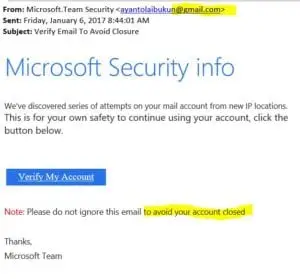
OK, so you got an email from “Microsoft” and it reads something like Microsoft Security info We’ve discovered series of attempts on your mail account from new IP locations. This is for your own safety to continue using your account, click the button below.

Without spending more than a few seconds you can see this came from a gmail account and also had grammar issues.  These are quick identifiers to show they are not legit.  Microsoft would never send you a message from gmail.  There are also other clues… if you hover over the “Verify My Account” link without clicking it revels a URL to a foreign server not a Microsoft domain.

Although this type of Phishing is nothing new, we have had a surge in inquiries regarding these messages.  Microsoft will not send you any email like this asking you to logon or provide credentials.  You should always type in the URL manually or use a bookmark and never click a link in an email message you are not sure of.

Refer back to our 8 Ways to protect yourself from Viruses and Malware article for additional information on avoiding malware.


Verizon Outage on Thanksgiving

No, it’s not your phone or the mass amount of Turkey you ate…Verizon Wireless appears to be having troubles with their network.  I’ve heard multiple complaints about making calls sending texts, all circuits busy, etc.  Some calls appear to start then disconnect to dead air after a short duration.

I’ve tried to call support but it appears they are off the next 2 days for the holiday.  I’m sure someone @verizon is seeing the issue but we’re not aware of what the issue is or ETA to repair.  If you hear anything or want to keep up to date check us out on facebook @TMDTechnologyServices  We will post outage information if we learn anything.

Hopefully Verizon fixes their outage soon.

You can look at http://downdetector.com/status/verizon/map/ to see the issue is widespread not just in Florida.

#Verizon Verizonwireless