How To Keep Your Password Secure

Password security graphic for protecting online accounts

How To Keep Your Password Secure

  • Make sure your password is long and strong. That means at least 12 characters. Making a password longer is generally the easiest way to make it stronger. Consider using a passphrase of random words so that your password is more memorable, but avoid using common words or phrases. If the service you are using does not allow long passwords, you can make your password stronger by mixing uppercase and lowercase letters, numbers, and symbols.
  • Don’t reuse passwords you’ve used on other accounts. Use different passwords for different accounts. That way, if a hacker gets your password for one account, they can’t use it to get into your other accounts.
  • Use multi-factor authentication when it’s an option. Some accounts offer extra security by requiring something in addition to a password to log in to your account. This is called multi-factor authentication. The “something extra” you need to log in to your account fall into two categories:
    • Something you have — like a passcode you get via an authentication app or a security key.
    • Something you are — like a scan of your fingerprint, your retina, or your face.
  • Consider a password manager. Most people have trouble keeping track of all of their passwords. The longer and more complicated a password is, the stronger it is, but a longer password can also be more difficult to remember. Consider storing your passwords and security questions in a reputable password manager. To find a reputable password manager, search independent review sites, and talk to friends and family for ones that they use. Make sure to use a strong password to secure the information in your password manager. KeeperSecurity & LastPass are just a couple options.
  • Pick security questions only you know the answer to. If a site asks you to answer security questions, avoid providing answers that are available in public records or easily found online, like your zip code, birthplace, or your mother’s maiden name. And don’t use questions with a limited number of responses that attackers can easily guess — like the color of your first car. You can even use nonsense answers to make guessing more difficult — but if you do, make sure you can remember what you use.
  • Change passwords quickly if there’s a breach. If a company tells you there was a data breach where a hacker could have gotten your password, change the password you use with that company right away, and on any account that uses a similar password.

Why businesses need DNS protection

DNS Protection

What is DNS protection?

Before we talk about DNS security, you need to understand the DNS. The domain name system (DNS) works like a phone book for the internet. When a user enters text into a browser, DNS servers take that input and translate it into the unique internet protocol (IP) addresses that let the browser open the desired site. But DNS protocols were never designed with security in mind, and are highly vulnerable to cyberattacks, such as cache poisoning, DDoS, DNS hijacking, botnets, C&C, man-in-the-middle, and more.

By redirecting users’ web traffic through a cloud-based, DNS security solution, businesses can finely tune and enforce web access policies, ensure regulatory compliance, and stop 88% of threats at the network’s edge—before they ever hit the network or endpoints.  If your business is like many others that have embraced remote workforce DNS Protection should absolutely be part of your network security plans.  DNS Protection can also secure your mobile workforce without interfering with the VPNs, firewalls, and other security tools you already use.

Why businesses need DNS protection

Uncontrolled internet access is a high-risk activity for any business, regardless of size.  DNS Protection helps protect you from wasted bandwidth, malware from sophisticated attacks such as ransomware and other cybercrime.

Per a report from EfficientIP, the average cost of a single attack was $715,000 USD. When you do the math, it’s clear how DNS Protection for servers, endpoints, and other networked devices could make all the difference to a business’ success (and survival).

What DNS Solution is best for my business?

Choosing a DNS protection solution doesn’t need to be hard.  There are several reputable options we can work with including Webroot DNS Protection & Cisco Umbrella.  These are 2 great solutions that offer up a DNS layered security to protect your workforce.  Don’t wait call us today. (561) 404-9251

Why use two-factor authentication (2FA) or Multifactor (MFA) with your VPN connection?

Two-factor authentication and account security illustration

What is a VPN?

Virtual private networks (VPNs) have been a popular way for companies to provide their employees remote access to their private servers and network resources. VPNs create secure connections between remote machines and your servers allowing your users to stay productive when out of the office. VPNs reduce the risk that hackers can find and enter your servers while your employees securely work from home or anywhere for that matter.

While VPNs are great, they are far from a perfect solution and are subject to security threats, such as phishing attacks. For example, an attacker will often send a legitimate looking email to one of your employees and invite them to log into their account via a link in the email to update their information, pay a bill, or other…. The hacker only has to wait for the unsuspecting employee to enter their username and password. Once in possession of valid credentials, the attacker will be able to connect to your VPN as a legitimate user, gain access to your network, steal information or cause other types of damage such as deploying ransomware.

Two-factor authentication and account security illustration

How 2FA two-factor authentication secures your VPN network

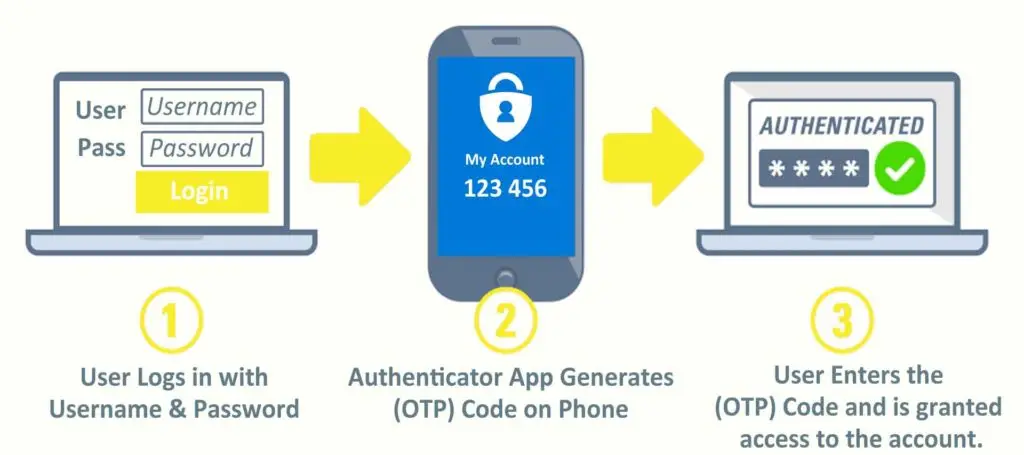
Two-factor authentication (2FA) reduces the risk that hackers can access your network using these stolen or compromised credentials. 2FA requires users to validate their identity by presenting a second security factor in addition to their password. When connecting to a corporate network, users must first enter their computer or VPN credentials, followed by a time-based one-time password (TOTP). This TOTP (usually a 6 digit numeric code) is displayed on users mobile phone in an application called an authenticator. Google Authenticator and Microsoft Authenticator are 2 popular and free apps compatible with both iPhone and Android devices.

2FA makes it extremely difficult to impersonate a user without having access to this second factor. This means that even if hackers were to steal all of your employees’ usernames and passwords, they still wouldn’t be able to access your VPN because they don’t have the 2FA code generated in the authenticator app.

How can I enable 2FA for my company’s VPN?

Every firewall and network is a little different and thus the configuration can vary dramatically. If you are interested in securing your network with 2FA please reach out to TMD Technology Services to assist you in determining the best path forward.

Aside from your VPN we highly recommend using 2FA on all your important accounts including email, banking, website and social media.

HOW TO SPOT A PHISHY EMAIL

Phishing email warning illustration for business email security

Security threats come in various forms and from many different directions. You’ve probably heard of viruses, trojans, keyloggers and ransomware. Want to know what many of these threats have in common? They can all be the result of phishing attacks.

Bad actors use bait – usually in the form of a seemingly legitimate email, file attachment or link — to “phish” for victims. These emails can be incredibly hard to tell as they often mimic legitimate emails that you receive on a regular basis.  Because this bait is usually spread via email, it’s hard for security software to filter out. That’s what makes it so scary.

Even if you have security software, phishing is a serious threat, one that can expose you to ransomware. Here's how to avoid these dangerous emails.