Top Scary Computer Hacks That Could Affect YOUR Business This October: 2018 Edition
2017 was a terrible year for the digital world and 2018 ain’t no better. Think your computer is safe from potential hackers? You’re wrong. Ghouls and witches aren’t the only scary thing this October! Vicious Ransomware, Malware, and Viruses are on the loose, and if not taken seriously, could dangerously affect your computer.
1) Gandcrab Ransomware
Gancrab was first discovered January of this year. This pesky bug encrypted users’ files and extorted a ransom in Cryptocurrency (DASH In particular).
Soon, Gancrab v1 was stopped in its tracks at the end of February. A decryptor was created and distributed online. Letting victims re-obtain their files without having to deal with the ransom.
Within one week (March), Gancrab v2 was released in the digital world. Tougher than it’s sibling before. Evolved from ransoming Crypto to attaching itself to personal Email.
Gancrab v3 got personal and changed it’s victim’s desktop wallpaper to a ransom note:
“We are sorry, but your files have been encrypted!
Don’t Worry, we can help you to return all your files!
Files Decryptor’s Price Is $900 USD
If Payment isn’t made until (date) the cost of decrypting files will be doubled”
Scary hu? What a way to put pressure on the victim!
Last but not least, Gancrab v4 was created soon after, and unfortunately armed with an abundance of updates, including a brand-new encryption algorithm. Using a microscopic algorithm (TEA) to be undetected, unless you REALLY look or have a program looking out for it specifically, Gancrab v4 is a vicious little bug.
Furthermore all encryptions have .KRAB instead of CRAB. They changed the way the ransomware attack its victims. Now spreading through fake software crack sites, once a user downloads and run a fake “stuffing” crack, the ransomware is then attached to the computer like a leech!
When you finally run this file, your computer is in Gancrab’s clutches.
Steps Gancrab v4 Goes For The Kill:
- Using fast (TEA) encryption algorithm to avoid detection, it creates itself a plain file.
- Once the decryption is complete, Gancrab v4 wastes no time and drop a nasty virus.
- Checks the list of the following processes obtaining CreateToolhelp32Snapshot API and terminate running programs.
- Stops any antivirus programs from running.
- Starts to encrypt victim’s files then delivers a ransom note on the user’s desktop.
How to prevent Gancrab Ransomware:

2) Trojan Glupteba
Not as severe as Gancrab, but this bug is one of the most annoying ones. There are so many variants of Trojan Glupteba, there’s too many to count. We’ll be here all day if we do. So many functionalities this bug entails, its insane.
How can Trojan Glupteba infect your computer? EASY, this bad boy can sneak into your computer data with ease using a file dropped by other malware. It gets away with it too, by pretending to be an authentic software.
Communicating with the user’s IP address, Glupteba gets to know the user pretty well. (whether the user likes it or not). It diverts the traffic towards unknown domains.
If You Have This Happening To You, Contact a Managed IT Service Immediately: Professional Virus Removal
It’s suspicious when you try to visit Facebook but somehow you end up in ostdownload.xyz or sportpics.xyzkinosport.top instead.
How To Prevent Trojan Glupteba:
- Enable Web and Email filters
- Browse Safely
- Regularly Update Your Antivirus Program (Hire an IT professional for a Virus Removal Service)
3) Kuik Adware
Kuik is a simple yet annoying piece of Adware. Some of the worst bugs we’re facing this year. This pesky guy takes the form of a malware & adware. It pretends to be the actual Adobe Flash Player “update”.
Of course when someone notice their Flash Player needing an update, some people don’t think twice and fall victim to Kuik Adware’s clutches.
This obnoxious adware is equip with legimite flash player modules, .exe file named ‘upp.exe’. Once in your computer’s system, it communicates with all established network interface and adds a DNS: 18.219.162.248
Of course, like all the others, starts to collect the user’s data. Then forwards it to it’s hosting domain, kuikdelivery.com.
As soon as the domain reaches the server, it’s game over. It then activates malicious tasks on the system (including Chrome Extension) from unknown sources, crypto miners, etc. etc.
How To Prevent Kuik Adware:
- Regularly Backup Important Data & Files
- Update Your Antivirus & Spyware Programs
- Block Any Spam Email with File Types: exe / pif / url / vb/ vbe/ com/ reg / cer / pst / cmd / bat / dll / dat / hta / js / wsf
4) Magniber Ransomware
Magniber is another vicious ransomware coming your way! Well… mostly in Asia, however, stay on your toes with this one! To be unlucky as to fall victim to Magniber is bad news. Don’t think less about this bug only cause it’s mostly affecting people in Asia, it’s slowly making its way over and the numbers are skyrocketing.
This unique Ransomware is spread through malvertisements.
What’s a Malvertisement? Infected web pages that redirects the user to a Magnitude Exploit kit website. Fun fact, it’s the eldest of most malicious browser toolkits that’s surprisingly still in use today to distribute ransomware. Go figure.
As soon as Magniber Ransomware James Bond’s it’s way into the user’s system, it immediately starts encrypting data. It uses a unique key to crack into your system obtaining what it needs to add further damage.
Once encrypted, it adds .dyaaghemy extension to all the files encrypted.
Towards the bottom on the files, you’ll find a file labeled, “Read Me”. There you’ll find the terrifying ransom note unique to each victim:
“Your documents, photos, database, and other important files have been encrypted!
Warning: Any attempts to restore your files with the 3rd party software will be fatal to your files. WARNING
To decrypt your software you need to buy the special software – “My Decryptor”
All transactions should be performed via Bitcoin network.
Within 5 days you can purchase this product at a special price: BTC 0.35
After 5 days the price of this product will increase up to BTC 0.700”
Creepy right?
The encrypted files are bugged with a unique key. Surprisingly, no patterns visible at first glance. This ransomware is scary as is, however it continues to grow and expand. It’s a major issue in Asia, but, it’s making its way to the US. It’s best to stay on your toes!
If you’re a business experiencing activity like this contact a professional immediately. A Business It Support is something your business need to stay safe as well as stay protected from future danger your computer might undergo.
How To Prevent Magniber Ransomware:
Regularly storing files in a cloud backup is ideal and the perfect backup plan for worse case scenarios. If you have valuable information that needs to be protected by all means, hire a professional managed IT service.
If you’re a business owner, it’s worth while to look into a Server Management service.
5) Thanatos Ransomware
Newer than its counterpart Gancrab, this guy is making its way through the tech world with ease. Remember the ILOVEYOU computer virus some time ago? Very similar.
Some of the most difficult ransomware to decrypt in 2018. It creates a randomly generated key every time for encryption. Which makes this malware hard to catch, and recover.
Soon after, it drops a payload (a.k.a. The all famous ransom note) in the user’s system in the form of the hacker’s favorite: .exe file or .txt file
Which is then set for auto run and opens every time the system is restarted. Thanatos Ransomware will start adding “.thanatos” extensions to infect your files. Soon enough, the user will receive a ransom note on it’s system.
How To Prevent Thanatos Ransomware:
- Disable macros & Activex when using MS Office products
- Backup your files & data regularly
- Update your operating systems & applications
Whether it’s a business computer or a personal computer, running into malicious malware, ransomware or computer virus isn’t on anyone’s to-do list.
When you’ve done all you can, updating your pc’s operating system, updated your current antivirus program, avoid anything suspicious and somehow still fell victim, don’t be ashamed! This could happen to anyone. These malware are designed to trick even the most careful of users.
You won’t be the first victim, nor be the last! Hiring professional Managed IT Service might be something you need this October. It’s towards the end of the year, which is every hacker’s favorite season, right around the holidays.
Keep your PC and business computer safe from malware / ransomware with an antivirus and malware protection plan.
A Virus Removal service will be taken care of by a professional who seen this issue before and will know what to do right away to help save your computer from current / potential danger it might undergo.


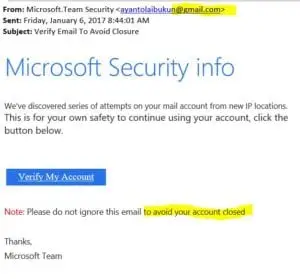 Without spending more than a few seconds you can see this came from a gmail account and also had grammar issues. These are quick identifiers to show they are not legit. Microsoft would never send you a message from gmail. There are also other clues… if you hover over the “Verify My Account” link without clicking it revels a URL to a foreign server not a Microsoft domain.