Create an app password for Office 365

An app password is a code that gives an app or device permission to access your Office 365 account.If your admin has turned on set up 2-step verification for your organization, and you’re using apps that connect to your Office 365 account, you’ll need to generate an app password so the app can connect to Office 365. For example, if you’re using Outlook 2016 or earlier with Office 365, you’ll need to create an app password.

  1. Check whether your Office 365 admin has turned on 2-step verification for your account. If they haven’t, when you try to do these steps you won’t see the options in Office 365.
  2. If you haven’t already done so, set up your account to use 2-step verification.
  3. Sign in to Office 365 using your password and verification code.
  4. Choose Settings Office 365 Settings button > Office 365.
  5. Choose Security & Privacy > Additional security verification.
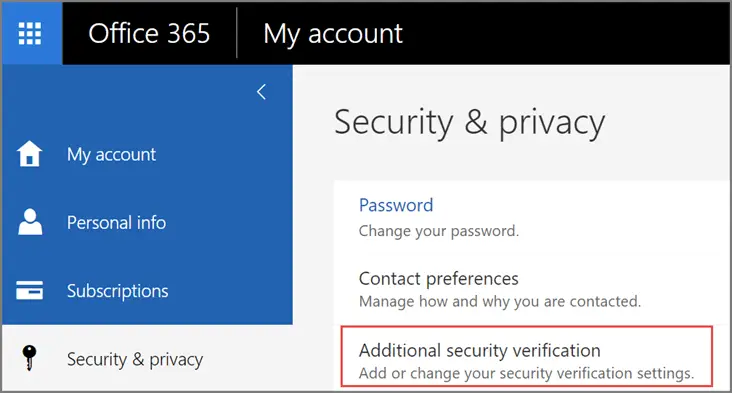
  1. Choose Update my phone numbers used for account security. This will display the following page:
  2. At the top of the page, choose App Passwords.

  1. Choose create to get an app password.
  2. If prompted, type a name for your app password (ex. Outlook), and click Next.
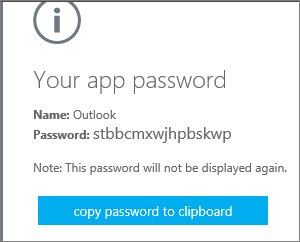
Choose copy to your clipboard.

Choose copy password to clipboard. You won’t need to memorize this password but it will not be able to be viewed again so ensure you capture it before closing.

Tip: If you create another app password, you’ll be prompted to name it. For example, you might name it “Outlook.”

  1. Go to the app that you want to connect to your Office 365 account. When prompted to enter a password, paste the app password in the box.

To use the app password in Outlook

You’ll need to do these steps once.

  1. Open Outlook, such as Outlook 2010, 2013, or 2016.
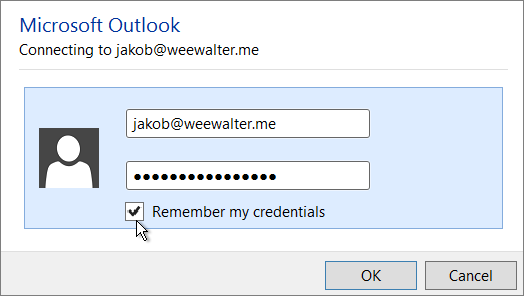
  2. Wherever you’re prompted for your password, paste the app password in the box. For example, if you’ve already added your account to Outlook, when prompted paste the app password here:Paste your app password in the Password box.
  3. Or, if you’re adding your Office 365 account to Outlook, enter your app password here:
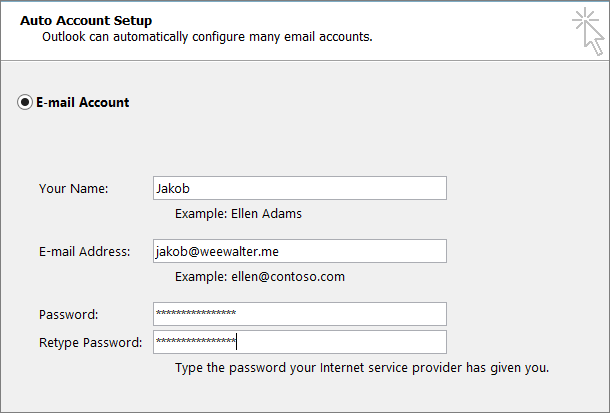
Enter your app password in both Password boxes.

  1. Restart Outlook.

Delray Beach 100ft Christmas Tree Lighting 2017

Delray Beach is known far and wide for its BIG Famous 100 Foot Christmas Tree.  This year, Delray has a brand new tree!

A month long celebration kicks off with Santa lighting the famous 100ft Christmas Tree at 7:15pm on November 30th. Directly following the Tree Lighting Santa will be available for photos! Enjoy ice-skating, Putt’n Around Mini Golf & Carousel and much more! Event is free, activities for a nominal fee! Old School Square Park in Delray Beach.

Holiday Activities

Tree Hours: Dec 1st–Jan 1st

Open Daily: 10am-9pm (Opens 1pm on Christmas Day and New Year’s Day) $1 suggested donation.

Visit with Santa: Dec 1st–Dec 23rd

Thursday–Sunday Evenings: 5pm–9pm Dec 18th, 19th, 20th: 5pm–9pm. Photos–$12. $20 Fast Pass to visit Santa.

Activities & Gift Shop Hours:

Open: Dec. 1st–Jan 1st
Weekdays: 5pm–9pm
Saturdays: 10am–9pm
Sundays: 1pm–9pm
School Holidays: Dec 25th–30th,1pm–9pm
Purchase tickets at the Gingerbread House Gift Shop on the east side of Old School Square Park.

Ice Skating

$7 per 45 minute session, $3 for socks if you forget yours; purchase at Gingerbread House.

Carousel

$3 per ride–purchase at Gingerbread House.

Putt’n Around Mini Golf

$3 for 6 holes–purchase at Gingerbread House.

Christmas at Cason Cottage! Dec 1st–Dec 31st

Thurs, Fri, Sat: 11am-3pm and 6pm-8pm. $1 suggested donation.

Old School Square Holiday Festivities: Dec 1st–27th

Shows, outdoor concerts & workshops. 
oldschoolsquare.org

The Christmas Tree Lighting is an absolutely great local event that the kids are sure to love!

Learn more https://100ftchristmastree.com/


Webroot SecureAnywhere AntiVirus

Editors' Choice

Many antivirus companies have dropped the idea of version updates, or yearly updates, opting instead to continually hone the product’s skills and slipstream in new features. Webroot SecureAnywhere AntiVirus has hardly changed visibly since my last review, but as an Editors’ Choice it merits a new review, comparing it with all the latest products. It’s still a winner.


  • PROS | Perfect score in malware protection test. Light on system resources. Good scores in malicious and fraudulent URL tests. Ransomware protection. Fastest scan. Advanced features.
  • CONS | No lab test results.
  • BOTTOM LINE | Small, speedy Webroot SecureAnywhere AntiVirus hardly uses any of your system’s resources. It aces our hands-on malware protection test, and it can even roll back ransomware activity.

Ultimate protection through machine learning

The Webroot® Threat Intelligence Platform is a cloud-based architecture that classifies and scores 95% of the internet 3x per day. With over 10 years’ experience innovating in the field of cutting-edge machine learning technology, Webroot Threat Intelligence provides the accuracy and context organizations and vendors need to protect themselves and their customers.

To learn more about this webroot PCMag review click here

Delray Beach July 4th 2017 Fireworks Celebration

When: The Delray Celebration Starts Tuesday, July 4, 2017 at 5PM until 9:30pm

The Delray Beach Celebration Schedule of Events

  • 5:00PM: FLAG RAISING AT ATLANTIC AVENUE AND GLEASON STREET
  • 5:30PM: SLIP AND THE SPINOUTS.
  • 7:00PM: AARON CARTER.
  • 7:30PM: AJR
  • 9:00PM: FIREWORKS FROM THE BEACH – NORTH OF THE MARRIOTT.

DELRAY BEACH STREET CLOSURES:

On Tuesday, July 4, beginning at 1:30pm, east Atlantic Avenue will be closed to vehicular traffic from the east side of NE/SE 7th Avenue to Ocean Blvd/SR A1A, including all side roads. In addition, Ocean Blvd/SR A1A will be closed from the south side of Thomas Street to the north side of Miramar Street. Road closures will remain in effect until approximately 11pm.

All southbound traffic on Ocean Blvd/SR A1A will be detoured via George Bush Blvd/NE 8th Street to US1/Federal Highway. All northbound traffic on Ocean Blvd/SR A1A will be detoured via Linton Blvd to US1/Federal Highway.

#DelrayBeachJ4  

More Info

Our Take on the New Surface 5… I Mean New Surface Pro

Many people are already asking whats with the new surface pro?  Is it worth an upgrade?  Well after a quick review of what the new surface can do we came up with a short list of items that we thought brought the most value to the New Surface Pro.

Our Top 3 reasons we would consider an upgrade from a Surface Pro 3 or Surface Pro 4

  1. Connectivity – With the arrival of the New Surface Pro Microsoft is finally adding the option for integrated 4G LTE.  This has been long overdue for a business tool such as the surface.  We all want to compute on the go and now we can much more easily.
  2. Battery Life – Microsoft claims that the New Surface Pro will last up to 13.5 hours on a single charge. This compares to nine hours with the Surface Pro 4 which is a significant improvement.  This claim is based on figures that refer to video playback so I’m hopefully optimistic that it translates to similar increases overall.
  3. Size Matters – Surface Pro is both lighter and quieter. There’s no longer a fan inside the m3 and i5 models, thus reducing the weight of the i5 version from 1.73 lbs to 1.7 lbs.  And if you’re upgrading from the Surface Pro 3 you go from 1.76 to 1.7 and get a larger display to boot.

Interesting and notable mentions: Though price is similar to the Surface Pro 4, Microsoft’s actually charging more because the Surface Pen ($99) is no longer included.

Our Opinion: The New Surface Pro is likely a practical and worthwhile update for Surface 3 Owners.  Surface Pro 4 owners are unlikely to be motivated to upgrade unless battery life and 4G connectivity are essential or important deciding factors.