
May 2026 Tech Tip: Travel Tech Tips – Stay Secure On Summer Trips

Remote Work IT Support

Summer travel season is right around the corner, and for South Florida professionals, that often means mixing business with leisure. Whether you’re flying out of Palm Beach International, visiting clients across the U.S., or working remotely from a hotel in Broward, your tech follows you. Unfortunately, cybercriminals know travelers are distracted and often careless with devices.

Here’s how to keep your data safe while on the move this summer.


1) Use a VPN on Public WiFi

Hotel, airport, and café WiFi are playgrounds for hackers.

  • Without VPN: Hackers can intercept logins and emails.

  • With VPN: Your connection is encrypted and private.

👉 Protect remote staff with secure setups from Remote Workforce Solutions.


2) Disable Auto-Connect WiFi

Most phones and laptops are set to join known networks automatically. Attackers exploit this by setting up fake hotspots named “Free Airport WiFi.”

  • Turn Off Auto-Join: Choose networks manually.

  • Forget Old Networks: Stops your device from leaking connection info.


3) Use Encrypted Storage

If you lose a laptop or phone while traveling, unencrypted drives leave everything exposed.

  • Turn On Full Disk Encryption: Protects your data even if stolen.

  • Use Strong PIN/Passcode: Don’t rely on “1234.”


4) Charge Safely

Beware of “juice jacking” in public USB ports. Attackers can load malware through charging stations.

  • Use Wall Adapters or Battery Packs: Safer than public ports.

  • USB Data Blockers: Allow charging without data transfer.


5) Back Up Before You Leave

Travel increases the risk of theft and damage.

  • Back Up to the Cloud: Ensure files are recoverable anywhere.

  • Test Restores: Confirm backups actually work.

👉 Rely on Cloud Backup Solutions to protect your business while employees are on the move.


✅ Final Thoughts

Traveling for work or vacation shouldn’t mean exposing your business to risk. A few easy precautions—VPNs, encryption, safe charging, and backups—keep you secure no matter where you are.

👉 TMD helps South Florida businesses protect travelers with Remote Workforce and Cloud Backup Solutions.

⚠️ Friendly reminder: Always stay secure online, use caution with emails and links, and when in doubt—ask a professional.

Why use two-factor authentication (2FA) or Multifactor (MFA) with your VPN connection?

What is a VPN?

Virtual private networks (VPNs) have been a popular way for companies to provide their employees remote access to their private servers and network resources. VPNs create secure connections between remote machines and your servers allowing your users to stay productive when out of the office. VPNs reduce the risk that hackers can find and enter your servers while your employees securely work from home or anywhere for that matter.

While VPNs are great, they are far from a perfect solution and are subject to security threats, such as phishing attacks. For example, an attacker will often send a legitimate looking email to one of your employees and invite them to log into their account via a link in the email to update their information, pay a bill, or other…. The hacker only has to wait for the unsuspecting employee to enter their username and password. Once in possession of valid credentials, the attacker will be able to connect to your VPN as a legitimate user, gain access to your network, steal information or cause other types of damage such as deploying ransomware.

How 2FA two-factor authentication secures your VPN network

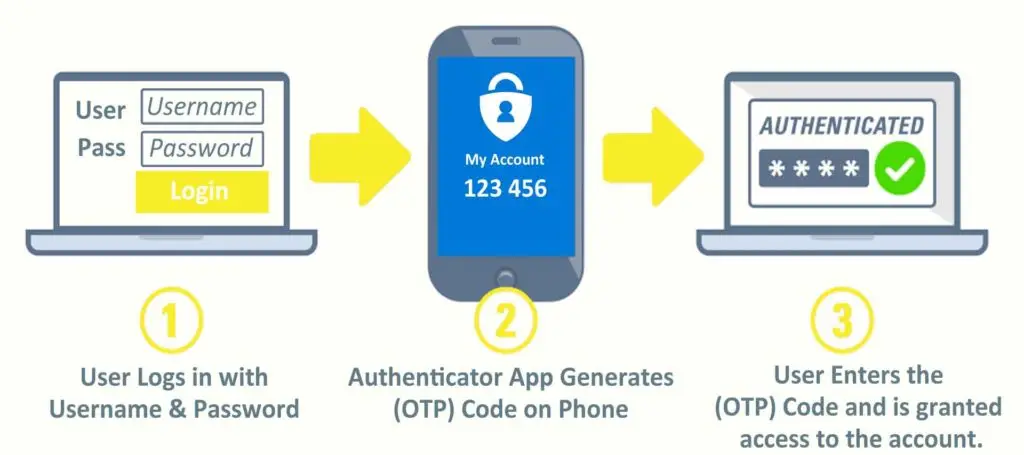
Two-factor authentication (2FA) reduces the risk that hackers can access your network using these stolen or compromised credentials. 2FA requires users to validate their identity by presenting a second security factor in addition to their password. When connecting to a corporate network, users must first enter their computer or VPN credentials, followed by a time-based one-time password (TOTP). This TOTP (usually a 6 digit numeric code) is displayed on users mobile phone in an application called an authenticator. Google Authenticator and Microsoft Authenticator are 2 popular and free apps compatible with both iPhone and Android devices.

2FA makes it extremely difficult to impersonate a user without having access to this second factor. This means that even if hackers were to steal all of your employees’ usernames and passwords, they still wouldn’t be able to access your VPN because they don’t have the 2FA code generated in the authenticator app.

How can I enable 2FA for my company’s VPN?

Every firewall and network is a little different and thus the configuration can vary dramatically. If you are interested in securing your network with 2FA please reach out to TMD Technology Services to assist you in determining the best path forward.

Aside from your VPN we highly recommend using 2FA on all your important accounts including email, banking, website and social media.